Table of Contents
What Is Sales Pipeline Management Software?
Why Sales Pipeline Management Is Critical for B2B Teams
Key Features to Look for in Sales Pipeline Management Software
How We Evaluated the Best Sales Pipeline Software
Key Features to Look for in Sales Pipeline Management Software
8 Best Sales Pipeline Management Software to Use in 2026
How to Move From a Spreadsheet to Pipeline Management Software
Free vs Paid Sales Pipeline Management Software
How to Choose the Right Sales Pipeline Software for Your Team
How to Manage a Sales Pipeline After Choosing the Software
How Cleverly Helps Teams Turn Pipelines into Predictable Revenue
Conclusion
Frequently Asked Questions
Modified On :
September 21, 2026
Key Takeaways
- Sales pipeline management software gives you visual deal tracking, automation, and forecasting to move opportunities forward predictably.
- Choose tools based on your team size, sales motion (outbound vs inbound), and integration needs, not just feature lists.
- Free plans work for early-stage teams, but paid software becomes necessary once you're managing 50+ deals or need accurate forecasting.
- HubSpot and Salesforce fit enterprise teams with complex cycles, while Pipedrive, Close, and Zoho work well for SMBs.
- The best pipeline tool is useless without quality leads and consistent follow-up discipline.
- Strong pipeline management combined with reliable lead generation creates predictable revenue, not just organized chaos
Sales pipeline management software helps B2B teams track opportunities, enforce next steps, identify stalled deals, and forecast revenue. The difficult part is choosing a platform that fits your sales process without paying for complexity your reps will never use.
For most small teams moving beyond spreadsheets, Pipedrive offers the clearest starting point. HubSpot is stronger when sales and marketing need a shared system, Close suits high-volume outbound teams, and Salesforce fits complex enterprise sales processes. The right choice depends on your team size, sales motion, reporting requirements, integrations, and willingness to administer the platform.
Cleverly has supported outbound programs across thousands of B2B businesses, giving our team a close view of what happens after a lead enters the pipeline. We reviewed eight leading platforms based on pipeline usability, automation, forecasting, integrations, scalability, and total implementation effort.
This guide explains where each tool fits, what it costs, and how to move from spreadsheet tracking to a pipeline system your sales team will actually maintain.
What Is Sales Pipeline Management Software?
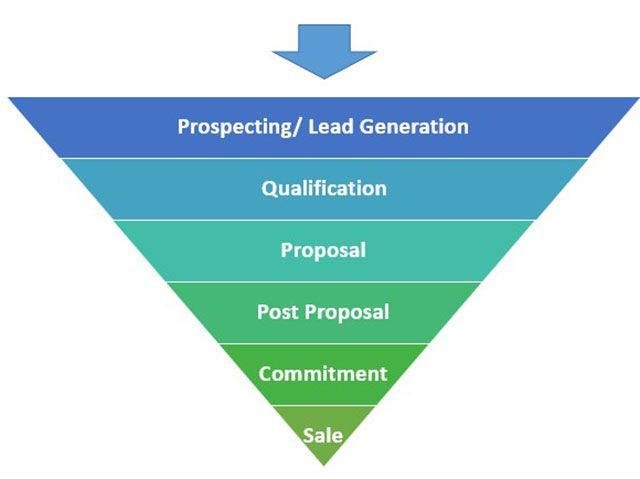
Sales pipeline management tools are platforms that help you track every deal from first contact to closed-won.
Think of them as your sales command center where you can see which prospects are in discovery, who's reviewing proposals, and what's about to close this quarter.
What separates pipeline tools from regular CRMs - while a CRM stores customer data and interaction history, an AI-native CRM can also automate workflows, surface insights, and help prioritize opportunities. Pipeline-focused software, meanwhile, is built specifically to visualize deal flow and move opportunities forward.
Some tools do both, but the best ones make it dead simple to see your entire pipeline at a glance.
Why pipeline visibility actually matters:
The difference between hoping you'll hit quota and knowing you will come down to visibility.
When you can see your pipeline clearly, you can forecast revenue accurately, spot bottlenecks before they kill deals, and focus your energy on opportunities that are actually moving.
Without a solid sales pipeline management tool, you're flying blind. With one, you know exactly where every deal stands, what action comes next, and whether you need more at the top of your funnel. It's the difference between reactive scrambling and proactive selling.
Also Check: Best Lead Scoring Tools for B2B Sales Teams
📈 Give Your Pipeline Better Opportunities to Track
Cleverly builds targeted LinkedIn, cold email, and cold-calling campaigns that put qualified B2B meetings on your sales team’s calendar.
Why Sales Pipeline Management Is Critical for B2B Teams
B2B sales cycles don't close in a week. You're looking at weeks, months, sometimes quarters of touchpoints before a deal crosses the finish line.
Without tools to manage sales pipeline properly, those long cycles turn into black holes where deals disappear and nobody knows why.
What makes B2B pipeline management different:
Your prospects aren't just getting emails from you. They're seeing LinkedIn messages, hopping on discovery calls, reviewing proposals, looping in decision makers, and going dark for two weeks because someone went on vacation.
Every one of those touchpoints needs to be tracked, or you lose the thread completely.

What good pipeline management actually gets you:
When you have the right tools to manage sales pipeline, you can forecast revenue without crossing your fingers.
You know which deals are real and which ones are just taking up space in your CRM. You can prioritize the opportunities that are actually ready to move instead of chasing tire kickers.
The alignment factor:
Where most B2B teams fall apart - Your SDRs book meetings, your AEs run demos, and leadership wants reports.
Without a clear pipeline system, everyone's working in silos and deals slip through the cracks during handoffs.
The right pipeline tool keeps everyone on the same page, so nothing gets lost when a lead moves from prospecting to close.
So, the bottom line is, if you're selling B2B, you need structured deal tracking. Everything else is just hoping for the best.
Read More: 10 B2B Sales KPIs Every Revenue Team Should Track
Key Features to Look for in Sales Pipeline Management Software
Not all pipeline tools are created equal. The best sales pipeline management software gives you everything you need to track deals without drowning in features you'll never use.
Here's what actually matters when you're evaluating options.
Customizable pipeline stages
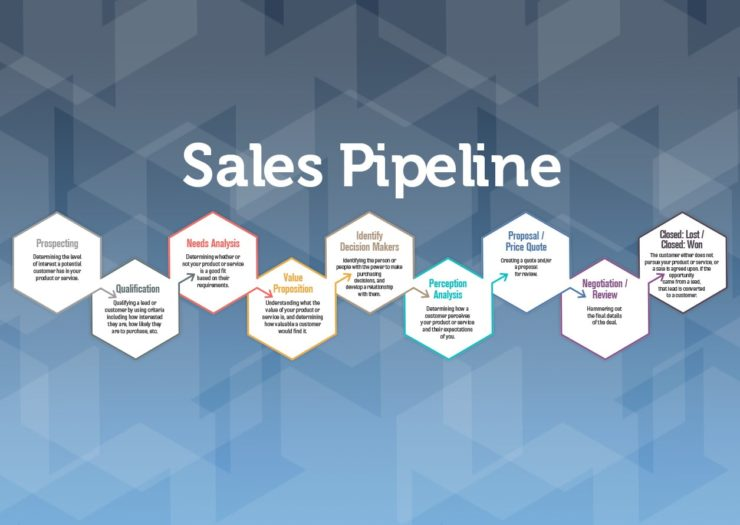
Your sales process isn't the same as everyone else's. You need software that lets you build stages that match how you actually sell, whether that's Discovery, Demo, Proposal, Negotiation, or whatever makes sense for your team. Cookie-cutter stages don't work in B2B.
Deal probability and forecasting:
Guessing which deals will close is expensive. The best sales pipeline management software assigns probability scores to each stage so you can forecast revenue accurately. You'll know the difference between $500K in your pipeline and $500K that's actually likely to close.
Activity tracking across channels
Your prospects aren't just getting emails. They're on LinkedIn, taking calls, and clicking through your content. Your pipeline tool needs to track all of it: calls, emails, LinkedIn touches, meeting notes, everything. If it's not logged, it didn't happen.
CRM integrations
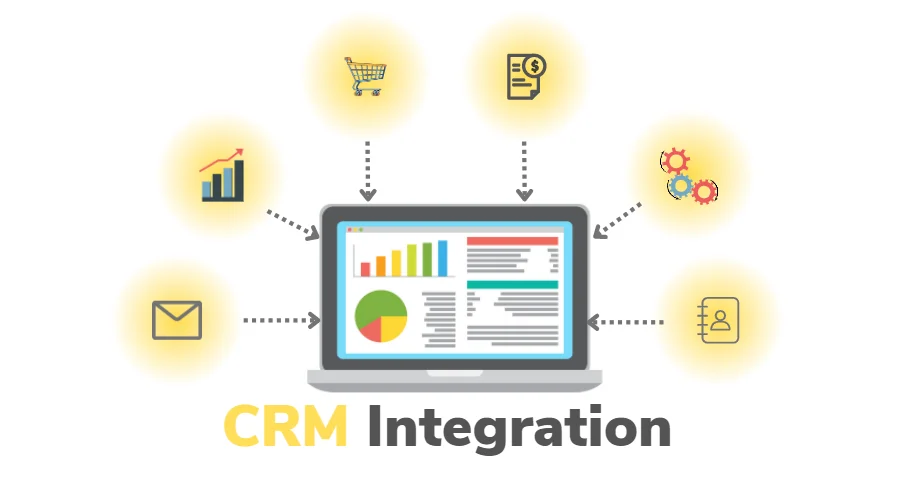
Your pipeline software should play nice with the tools you already use. Look for native integrations with your CRM, email software, calendar, and communication tools. Manual data entry is a pipeline killer.
Meeting notes need to flow into the CRM too: if reps use Granola AI notetaker, check whether its summaries reach the right deal record or have to be copied in manually.
Automation and alerts
Deals go stale when nobody follows up. Good pipeline software automates reminders, triggers alerts when deals sit too long, and nudges your team to take action. You want the software doing the remembering, not your reps.
Reporting and revenue dashboards
If you can't see it, you can't fix it. Real-time dashboards showing deal velocity, conversion rates by stage, and revenue projections keep your entire team focused on what matters. Leadership gets visibility without micromanaging, and reps know exactly where they stand.
The right features turn your pipeline from a spreadsheet mess into a revenue-generating machine.
Dive Deeper: Sales and Marketing Alignment Explained for Modern B2B Teams
🎯 Better Pipeline Starts With Better-Fit Leads
Get a done-for-you outbound campaign built around your ideal customer profile, qualification criteria, and sales goals.
How We Evaluated the Best Sales Pipeline Software
A long feature list does not tell you whether a platform will work for your sales team. We assessed each option against the parts of pipeline management that affect daily execution and reporting.
Our evaluation focused on six areas:
- Pipeline usability: Can reps update deals, review next steps, and find stalled opportunities without digging through several screens?
- Workflow automation: Can the system assign leads, create follow-up tasks, send alerts, and reduce repetitive data entry?
- Forecasting and reporting: Does it provide stage conversion rates, pipeline coverage, deal velocity, and realistic revenue forecasts?
- Integrations and data quality: Does it connect with the team’s email, calendar, prospecting, calling, and marketing systems without creating duplicate records?
- Scalability: Can the platform support more users, pipelines, territories, permissions, and reporting requirements as the sales operation grows?
- Cost and implementation effort: Does the value justify the subscription, migration, onboarding, administration, and training required?
Cleverly does not sell sales pipeline software, and no vendor paid for placement in this list. Product features and pricing should still be confirmed directly with each provider because packages change frequently.
Which Sales Pipeline Tool Is Best for Your Use Case?
If you need a fast shortlist, start with the way your team sells rather than comparing every feature across every platform.
Best for small teams moving beyond spreadsheets: Pipedrive
Pipedrive is a practical choice for small B2B teams that want visual deal tracking without a lengthy implementation. Its activity-focused workflow helps reps connect each opportunity with a clear next step, which is often the biggest improvement a spreadsheet-based team needs.
Best for teams combining sales and marketing: HubSpot
HubSpot suits companies that want sales activity, marketing engagement, lead scoring, and customer data in one system. It is especially useful when marketing and sales need shared reporting, but advanced automation and forecasting can raise the total cost quickly.
Best for complex enterprise sales: Salesforce
Salesforce fits organizations with multiple teams, territories, approval processes, and highly customized deal stages. Its flexibility is a strength when a company has the RevOps support to configure and maintain it. For a small team with a simple pipeline, that same flexibility can create unnecessary administration.
Best for high-volume calling and email: Close
Close is built for inside-sales teams that want calling, email, SMS, and pipeline management in one workspace. It reduces the need to move between a CRM and separate communication tools, making it a strong option for structured outbound motions.
Best for budget-conscious customization: Zoho CRM
Zoho CRM works well for growing teams that need multiple pipelines, workflow rules, reporting, and customization at a lower entry cost than many enterprise platforms. Confirm which features are included in each edition because the differences between plans affect automation and analytics.
Best for teams already using Monday.com: Monday Sales CRM
Monday Sales CRM makes sense when sales, delivery, and operations already work in Monday.com. Teams can configure visual workflows without extensive development, although they should test whether the reporting depth meets their forecasting requirements.
Best for AI-assisted prioritization: Freshsales
Freshsales combines pipeline tracking with lead scoring, deal insights, and communication features. It is a sensible option for teams that want guided prioritization without adopting a larger enterprise platform.
Best for sales-to-delivery handoffs: Insightly
Insightly is useful for service businesses that need to carry deal context into post-sale project delivery. Its connected CRM and project-management model can reduce information loss when an opportunity becomes an active client engagement.
8 Best Sales Pipeline Management Software to Use in 2026
We tested dozens of platforms and narrowed it down to the best software to manage B2B sales pipelines based on features, pricing, ease of use, and how well they handle real sales workflows. Pick the best one for you:
1. HubSpot CRM
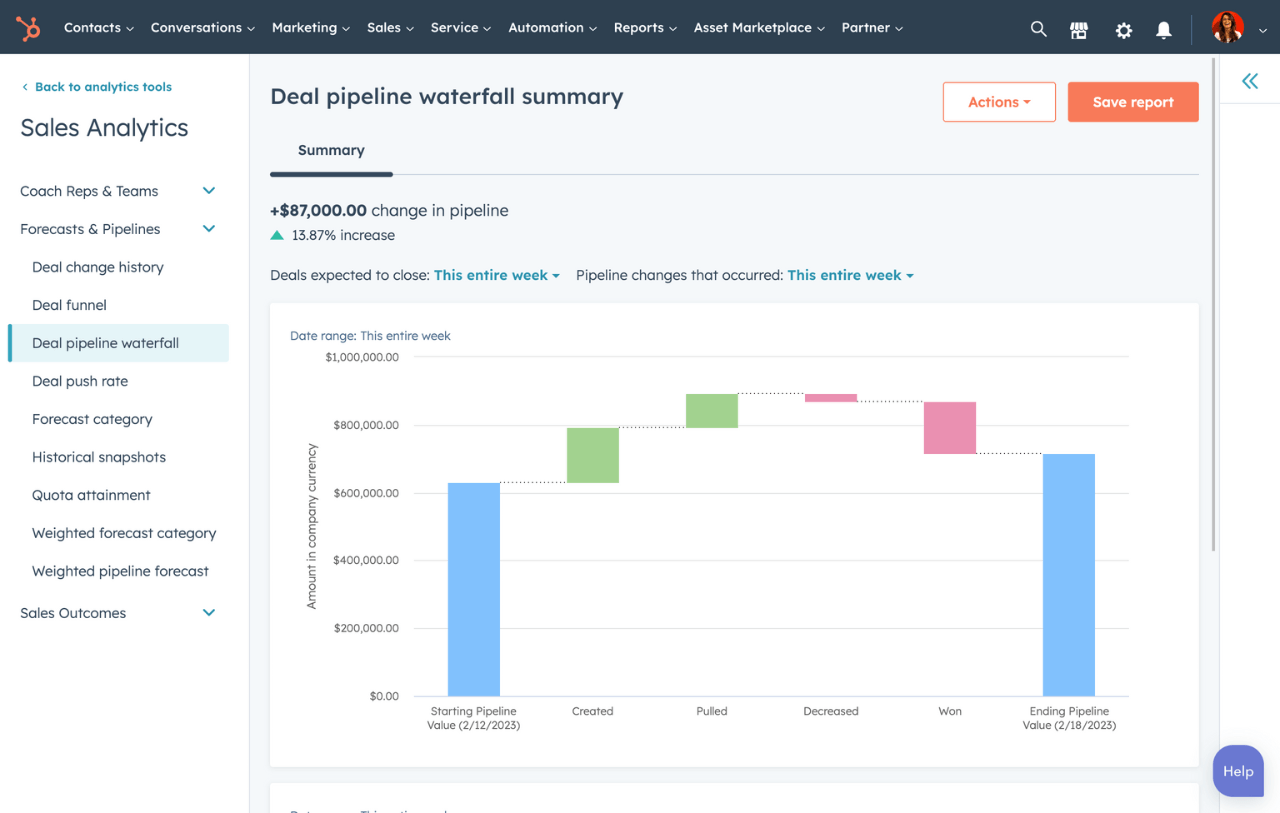
HubSpot CRM is the Swiss Army knife of sales pipeline management software. It gives you visual deal tracking, automation, and forecasting in one place, without making you feel like you need a PhD to use it.
What makes HubSpot stand out is how it scales with you. Whether you're a two-person startup or a 200-person sales team, you can start with the basics and add features as you grow without switching platforms.
Core Pipeline Features:
- Visual drag-and-drop pipeline board that shows exactly where every deal sits.
- Customizable deal stages that match your actual sales process.
- Automatic tracking of emails, calls, and meetings so nothing falls through the cracks.
- Workflow automation for follow-ups, task assignments, and repetitive admin work.
- AI-powered sales forecasting based on your pipeline data and conversion history.
- Real-time dashboards showing pipeline health, rep performance, and conversion rates.
- Lead scoring to help your team focus on deals most likely to close.
- Native integrations with Gmail, Outlook, Slack, and the entire HubSpot ecosystem.
Ideal Company Size/Use Case:
Startups to enterprise teams. If you're just getting started, the free version gives you solid pipeline visibility. Growing teams that need advanced automation, multiple pipelines, and detailed forecasting will want the Professional or Enterprise tiers. Works especially well for B2B and SaaS companies that need sales and marketing alignment.
Pricing (billed annually):
- Free: $0 (basic pipeline features, 2 users)
- Starter: ~$15/user/month (email tracking, meeting scheduling, basic automation)
- Professional: ~$90/user/month (sequences, predictive lead scoring, forecasting, sales automation)
- Enterprise: ~$150/user/month (advanced forecasting, conversation intelligence, custom playbooks)
2. Salesforce Sales Cloud
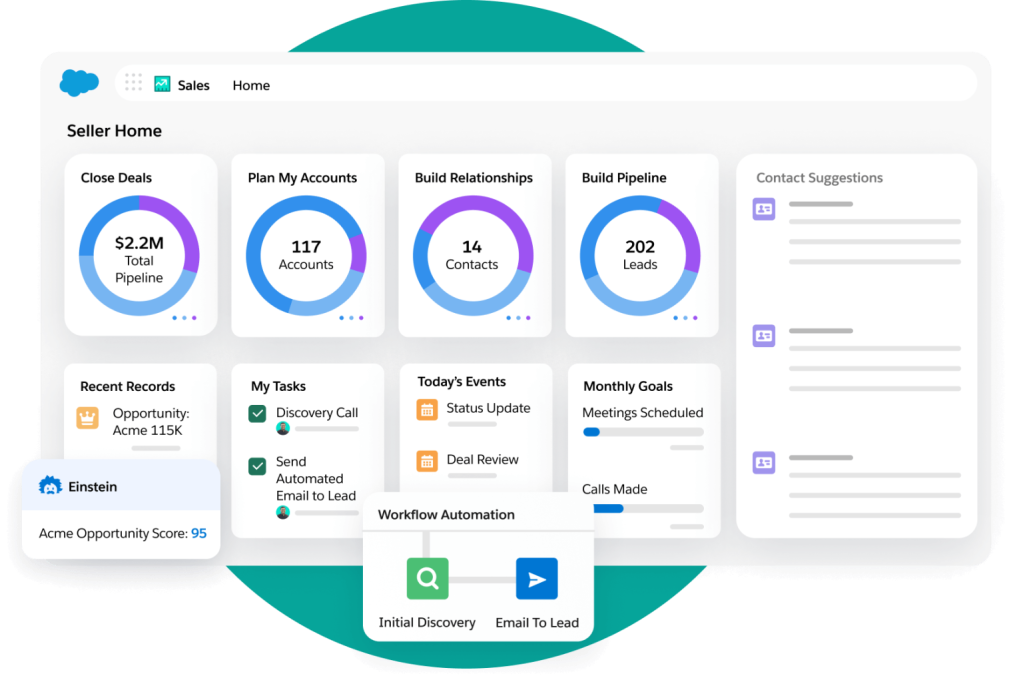
Salesforce Sales Cloud is the heavyweight champion of CRM platforms. It's built for teams that need serious horsepower to manage complex B2B sales cycles, enterprise-level deal tracking, and deep customization across every stage of the pipeline.
This isn't a simple sales pipeline management tool. It's a full sales operating system with AI-powered insights, advanced forecasting, and integrations that connect your entire revenue operation. If you need enterprise-grade features and have the budget to match, Salesforce delivers.
Core Pipeline Features:
- Opportunity management with fully customizable sales stages from qualification to close.
- Lead capture, scoring, and intelligent routing to get prospects to the right reps fast.
- Pipeline inspection views that show deal status, changes over time, and AI recommendations.
- Real-time sales forecasting with predictive analytics to spot at-risk deals.
- Automatic activity logging for emails, calls, and meetings across all customer touchpoints.
- Workflow automation for lead assignment, follow-ups, and approval processes.
- Customizable dashboards and reports for real-time pipeline visibility and performance tracking.
- Einstein AI for intelligent opportunity prioritization and next-best-action recommendations.
Ideal Company Size/Use Case:
Mid-market to enterprise companies managing complex B2B sales cycles. Perfect for large field sales teams, regulated industries like financial services and healthcare, and organizations that need to standardize processes across multiple departments. Best fit for companies ready to invest in a fully customized sales infrastructure.
Pricing (billed annually):
- Starter Suite: $25/user/month (basic CRM for small teams)
- Professional: $100/user/month (forecasting, customization for growing teams)
- Enterprise: $165/user/month (advanced workflows, AI features, extensive integrations)
- Unlimited: $330/user/month (full functionality, unlimited customization, premium support)
3. Pipedrive
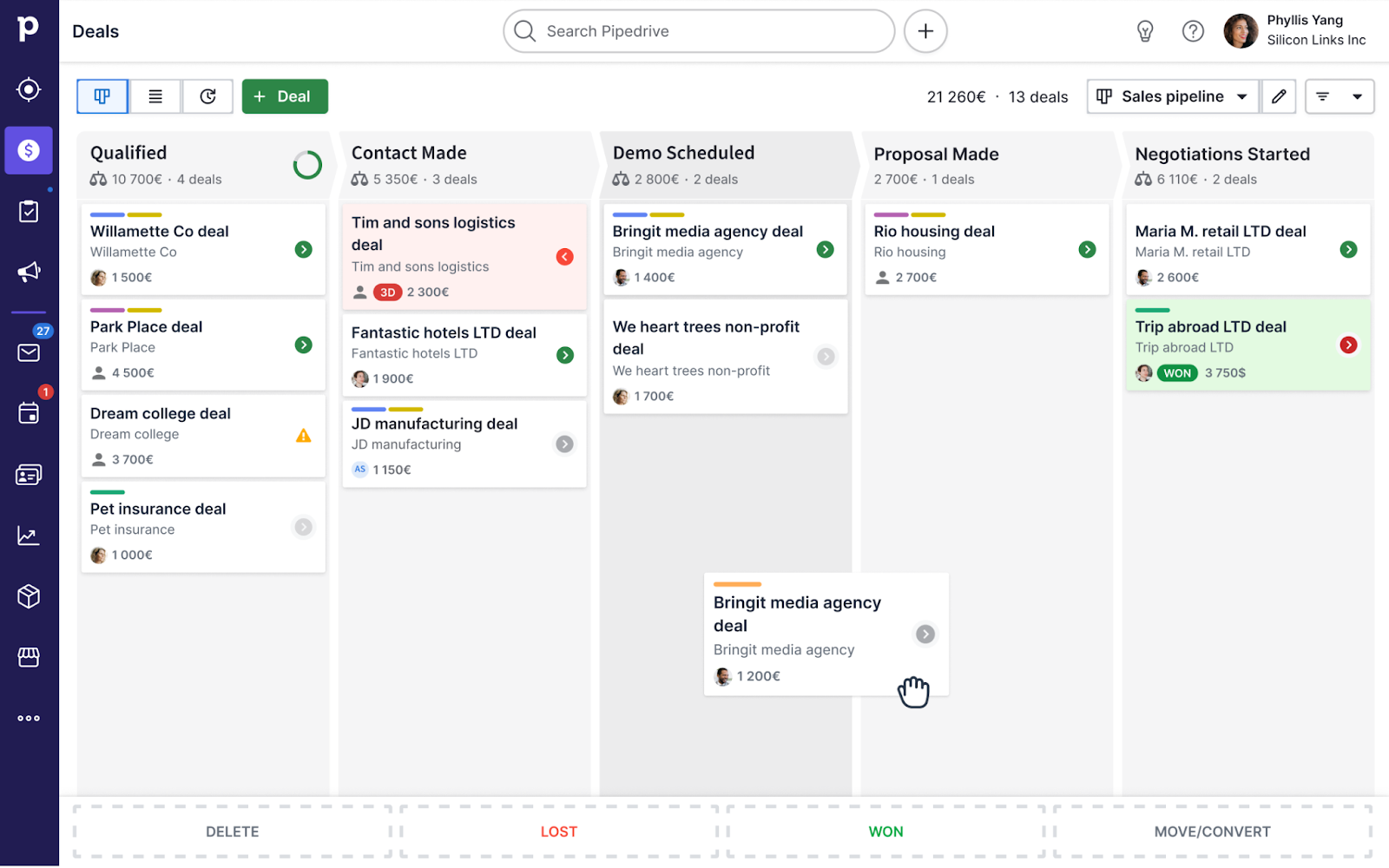
Pipedrive is software to manage B2B sales pipelines without the complexity overload. It's built around a clean, visual kanban board that shows you exactly where every deal sits, making it perfect for teams that want powerful pipeline management without needing a manual to figure it out.
What sets Pipedrive apart is its focus on activity-based selling. Instead of just tracking deals, it pushes your team to log the actions that actually move opportunities forward: calls, meetings, follow-ups, all with automated reminders so nothing slips.
Core Pipeline Features:
- Visual kanban-style pipeline with drag-and-drop deal management.
- Fully customizable pipeline stages and fields to match your sales process.
- Activity scheduling and automated reminders for calls, meetings, and follow-ups.
- Sales workflow automation to eliminate repetitive admin tasks.
- Centralized lead and contact management with full interaction history.
- Real-time reporting, conversion analytics, and revenue forecasting.
- Full mobile app functionality for managing deals on the go.
Ideal Company Size/Use Case:
Small to mid-sized B2B teams that need simplicity and speed. Perfect for startups, solo entrepreneurs, and sales-driven companies in real estate, consulting, IT, and marketing. If you've tried Salesforce and felt overwhelmed, Pipedrive is the straightforward alternative that still delivers serious pipeline visibility.
Pricing (billed annually):
- Essential: $14.90/user/month (core pipeline management, 400+ integrations)
- Advanced: $24.90/user/month (email sync, templates, meeting scheduling, automation builder)
- Professional: $49.90/user/month (revenue forecasting, document management, enhanced reporting)
- Power: $64.90/user/month (project tracking, scalable permissions, phone support)
- Enterprise: $99/user/month (unlimited features, enhanced security, maximum automation)
4. Zoho CRM
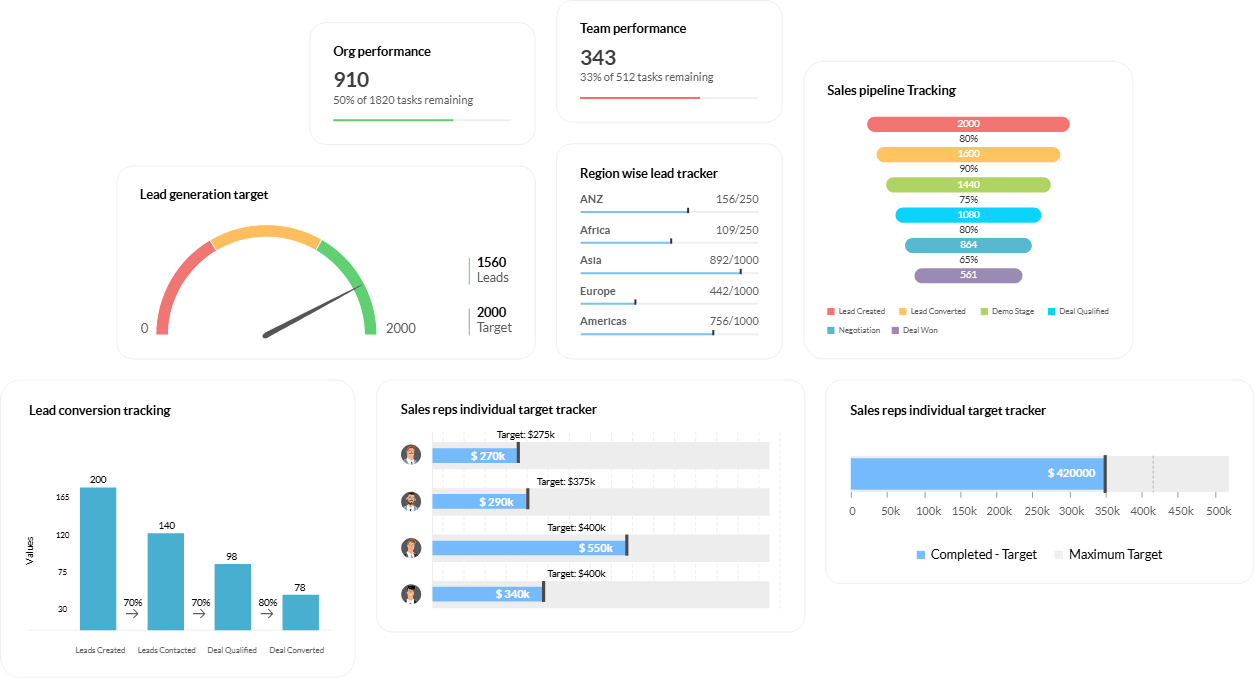
Zoho CRM is the budget-friendly powerhouse that doesn't skimp on features. It's software to manage B2B sales pipelines with deep customization, AI-driven insights, and automation tools that rival platforms costing three times as much.
What makes Zoho stand out is its flexibility. You can build multiple pipelines for different products or teams, automate your entire sales process with Blueprint workflows, and get AI recommendations on which deals to prioritize. All without breaking the bank.
Core Pipeline Features:
- Visual drag-and-drop pipeline management across all deal stages.
- Multiple custom pipelines for different products, services, or sales teams.
- Blueprint workflows that guide reps through your exact sales process step-by-step.
- Automatic lead scoring and prioritization based on engagement and behavior.
- Zia AI assistant for predictive insights, optimal contact timing, and deal probability.
- Real-time analytics, funnel reports, and customizable KPI dashboards.
- Omnichannel communication tracking across email, phone, social media, and live chat.
- Full-featured mobile app for managing deals and logging activities anywhere.
Ideal Company Size/Use Case:
Small to mid-sized B2B businesses that need enterprise-level features at SMB prices. Perfect for growing companies in IT, real estate, financial services, and retail that are ready to graduate from spreadsheets to real pipeline management. Ideal if you need affordable customization without compromising on automation or AI capabilities.
Pricing (billed annually):
- Free Edition: $0/user/month (up to 3 users, basic lead and contact management).
- Standard: $14/user/month (multiple pipelines, mass email, workflow automation).
- Professional: $23/user/month (Blueprint process management, inventory, sales forecasting).
- Enterprise: $40/user/month (Zia AI assistant, territory management, advanced customization).
- Ultimate: $52/user/month (advanced BI, enhanced limits, dedicated AI/ML platform)
5. Freshsales
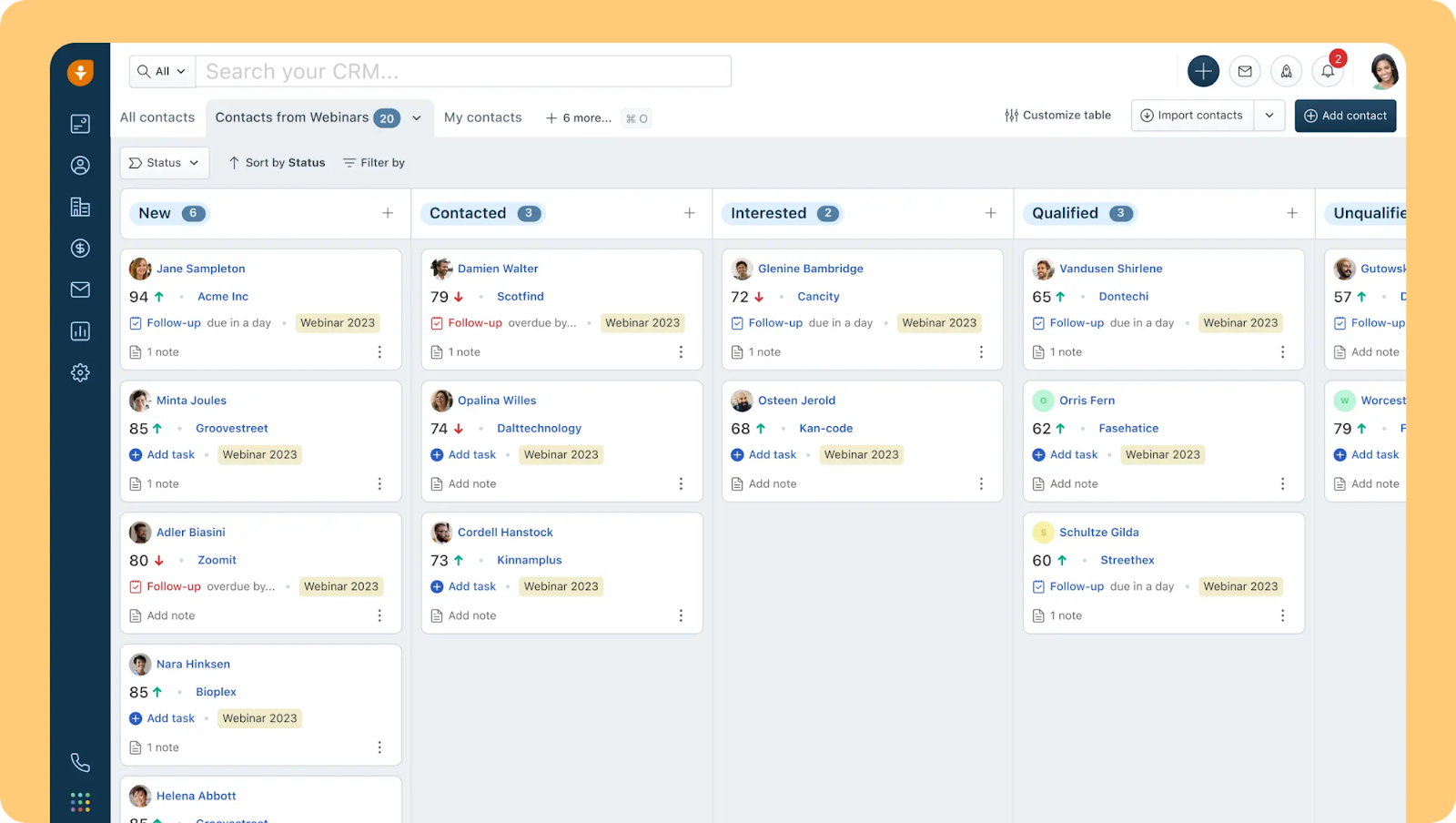
Freshsales is AI-powered sales pipeline management software that combines CRM, communication tools, and automation in one clean package. Built by Freshworks, it's designed for teams that want serious functionality without the enterprise-level complexity or price tag.
What sets Freshsales apart is Freddy AI, which scores leads, predicts deal outcomes, and tells you exactly what to do next. It's like having a sales coach built into your pipeline, helping reps focus on deals that are actually going to close.
Core Pipeline Features:
- Visual Kanban-style pipeline with drag-and-drop deal management.
- Multiple custom pipelines for different teams or product lines (Pro plan and up).
- Freddy AI for intelligent lead scoring, deal insights, and sales forecasting.
- Activity tracking with color-coded alerts for overdue or pending tasks.
- Full customization of sales stages, fields, and metrics to match your process.
- Workflow automation for email sequences, field updates, and lead assignment.
- 360-degree contact view showing complete interaction history in one place.
- Built-in reports and dashboards to track performance, spot bottlenecks, and forecast revenue.
Ideal Company Size/Use Case:
Startups to enterprise teams managing high lead volumes across multiple channels. Perfect for B2B companies that need built-in communication tools (email, phone, chat) without juggling separate platforms. Best fit for teams that want AI-driven insights and automation without spending months on implementation.
Pricing (billed annually):
- Free: $0/user/month (up to 3 users, basic contact and deal management, built-in phone/chat)
- Growth: $9/user/month annually (visual pipelines, basic workflows, two-way email sync)
- Pro: $39/user/month annually (multiple pipelines, AI deal insights, advanced workflows)
- Enterprise: $59/user/month annually (sales forecasting, advanced lead enrichment, sandbox environment)
6. Close CRM
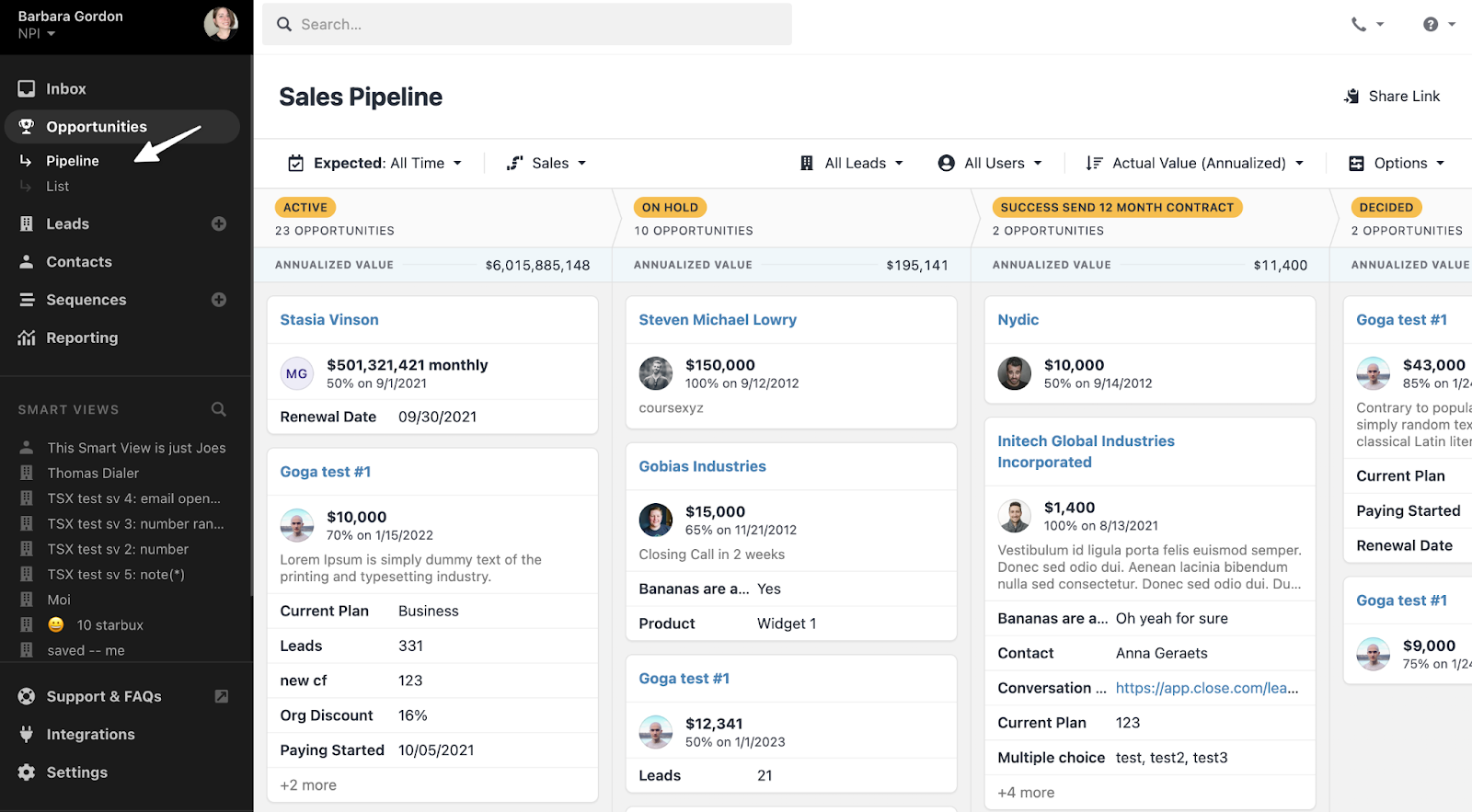
Close CRM is built for teams that live on the phone. It's sales pipeline management software with calling, emailing, and texting baked right in, so your reps never have to leave the platform to make a dial or send a follow-up.
What makes Close different is how it eliminates tool-switching. Everything your team needs to move deals forward, from pipeline tracking to outbound communication, happens in one place. Every call, email, and text is automatically logged, so your pipeline data is always complete.
Core Pipeline Features:
- Visual drag-and-drop pipeline to track deals from lead to close.
- Built-in calling, email, and SMS with automatic activity logging.
- Sales automation and email sequences to keep follow-ups consistent.
- Centralized lead and opportunity management with full interaction history.
- Pipeline analytics, opportunity funnel reports, and revenue forecasting.
- AI-powered Pipeline Guidance that flags stalled deals and recommends next actions.
- Fully customizable fields and pipeline stages to match your sales process.
Ideal Company Size/Use Case:
Small to mid-sized inside sales teams (up to 100 users) doing heavy outbound calling and email outreach. Perfect for startups and high-growth B2B companies that need a unified platform without the complexity of enterprise CRMs. Best fit for sales-driven teams tired of switching between dialers, email tools, and their CRM.
Pricing (14-day free trial available):
- Startup: $59/user/month (basic pipeline and communication features)
- Professional: $109/user/month (full calling, email sequences, advanced automation)
- Enterprise: $149/user/month (advanced reporting, permissions, priority support)
7. Monday Sales CRM
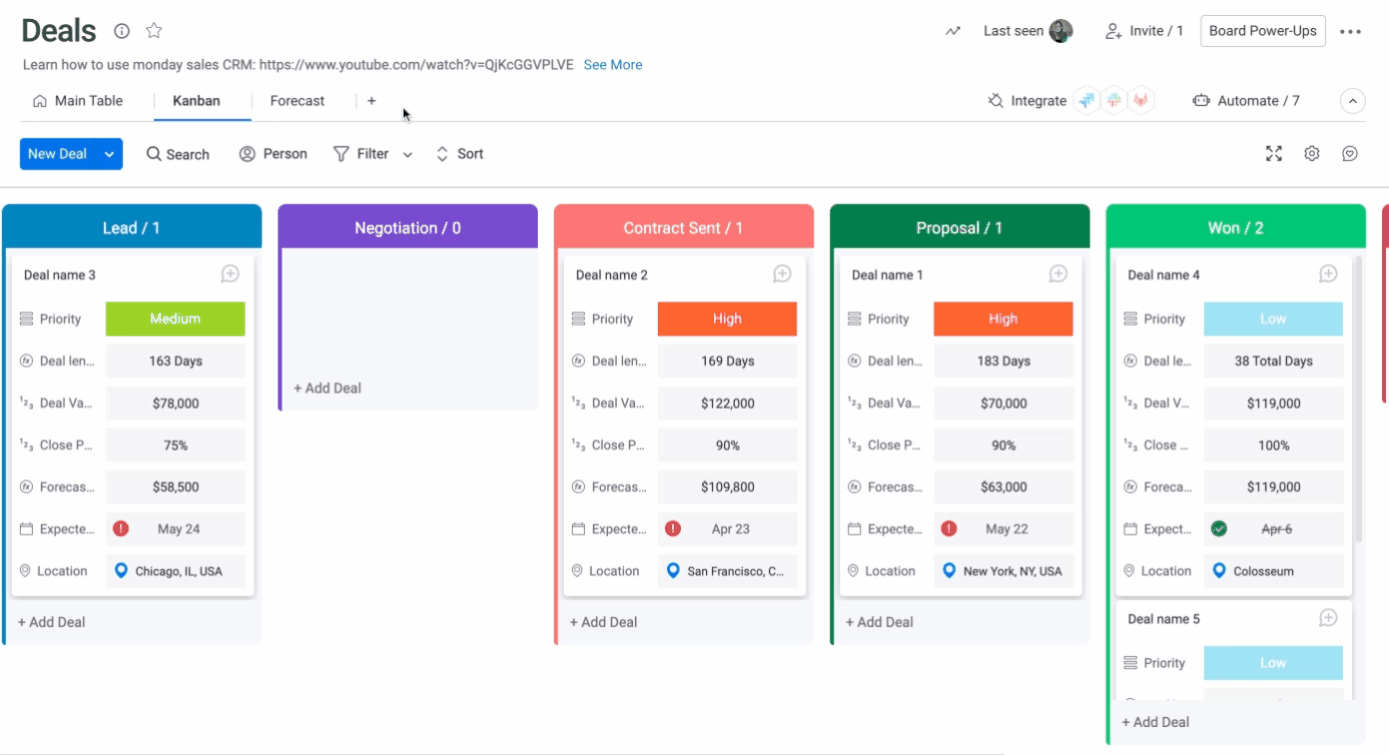
Monday Sales CRM brings visual project management to pipeline tracking. Built on the Monday.com platform, it's the best software to manage B2B sales pipelines for teams that want total customization without needing a developer to set it up.
What sets Monday apart is its no-code automation and extreme flexibility. You can build workflows, automate follow-ups, and customize your entire sales process using simple drag-and-drop tools. If you're already using Monday.com for other functions, this keeps everything under one roof.
Core Pipeline Features:
- Customizable Kanban-style boards with drag-and-drop deal tracking.
- No-code automation recipes for lead assignment, follow-ups, and stage updates.
- Two-way email sync with Gmail and Outlook for centralized communication tracking.
- Lead capture from web forms with AI-powered scoring (higher tiers).
- Sales analytics, forecasting dashboards, and performance reporting.
- Integrated call logging, meeting notes, and contact management.
- Full mobile app for pipeline management on the go.
- Built-in quote and invoice generation.
Ideal Company Size/Use Case:
Small to mid-sized B2B teams that prioritize visual workflows and customization. Perfect for companies already using Monday.com who want to centralize sales, marketing, and project management in one platform. Best fit for teams that need flexibility without technical complexity or those tired of rigid CRM structures.
Pricing (Minimum 3 seats for paid plans. Billed annually):
- Free: $0 (up to 2 users, basic contact management)
- Basic: $12/seat/month annually (unlimited contacts and pipelines, web forms, basic dashboard)
- Standard: $17/seat/month annually (two-way email sync, quotes/invoices, limited automations)
- Pro: $28/seat/month annually (sales forecasting, mass email, email tracking, expanded automation)
- Enterprise: Custom pricing (lead scoring, team goals, enterprise security, dedicated support)
8. Insightly
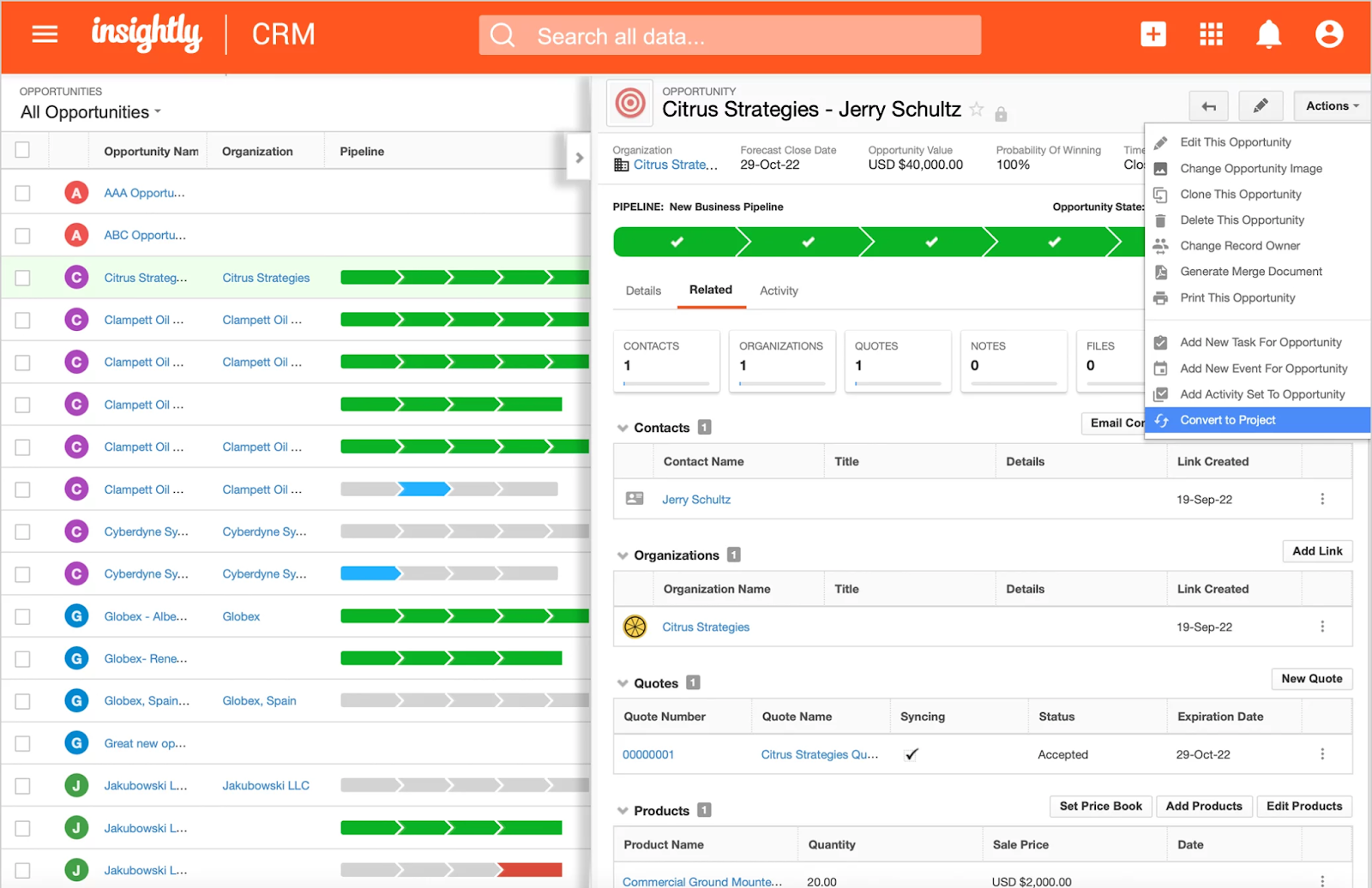
Insightly is the all-in-one platform that bridges the gap between sales and delivery. It's best software to manage B2B sales pipelines while also handling the projects that come after deals close, making it perfect for teams that need more than just a CRM.
What makes Insightly stand out is how it connects your entire revenue operation. When a deal closes, it automatically converts into a project with full context and history intact. No more information lost in handoffs between sales and delivery teams.
Core Pipeline Features:
- Fully customizable pipeline stages for sales opportunities and projects.
- Visual Kanban board with drag-and-drop deal management.
- Lead capture, qualification, and automated routing from web forms or emails.
- Activity sets that auto-generate tasks when deals hit specific stages.
- Sales forecasting with probability percentages assigned to each pipeline stage.
- Direct project management integration for post-sale delivery tracking.
- Customizable dashboards and reports for pipeline health and conversion metrics.
- Centralized communication history with complete 360-degree contact views.
Ideal Company Size/Use Case:
Small to mid-sized B2B teams, plus growing companies that need an affordable Salesforce alternative. Perfect for businesses with complex sales involving multiple stakeholders and teams that need to track deals through delivery, not just close. Ideal if you want CRM, marketing automation, and project management in one unified platform.
Pricing (Billed annually):
- Plus: $29/user/month (core CRM and pipeline features)
- Professional: $49/user/month (advanced automation and reporting)
- Enterprise: $99/user/month (full feature set with enhanced customization)
How to Move From a Spreadsheet to Pipeline Management Software
Moving to sales pipeline software should improve process discipline, not copy every problem from the old spreadsheet into a new interface. Clean the process before importing the data.
1. Define your pipeline stages
Create stages based on observable buyer progress. “Interested” is vague; “Discovery completed” or “Proposal reviewed” is measurable. Give every stage a clear entry condition, exit condition, owner, and required next action.
A simple B2B pipeline might include:
- Qualified
- Discovery scheduled
- Discovery completed
- Solution or demo presented
- Proposal sent
- Negotiation
- Closed won
- Closed lost
Do not add stages merely because the software allows it. Every additional stage creates another decision reps must make and another field leadership must interpret.
2. Clean the existing data
Remove duplicate contacts, closed opportunities recorded as active, incomplete records, and accounts with no valid owner. Standardize company names, deal values, close dates, and stage labels before import.
If unreliable spreadsheet data enters the new platform, the first dashboard will look impressive while telling you very little.
3. Decide which fields are required
Import only the data your team will maintain and use. At minimum, each open opportunity should have:
- Account and primary contact
- Deal owner
- Current stage
- Estimated value
- Expected close date
- Last completed activity
- Next action and due date
- Lead source
- Closed-lost reason, when applicable
Too many required fields slow adoption. Too few make forecasting unreliable.
4. Import a test batch
Test a small set of records before moving the complete pipeline. Check field mapping, ownership, activity history, dates, currencies, and duplicate handling. Correct the import process before loading thousands of records.
5. Build the minimum automation needed
Start with lead assignment, overdue-task alerts, stale-deal notifications, and required next-step reminders. Do not automate every possible action during the first week. Reps need to understand the process before automation begins making decisions on their behalf.
6. Run the spreadsheet and software in parallel briefly
Use a short validation period to confirm that every active opportunity made it into the new system. Set a firm date after which the software becomes the only source of truth. Keeping both systems indefinitely guarantees conflicting pipeline numbers.
7. Review adoption after 30 days
Check whether reps update stages consistently, log next steps, close stale opportunities, and trust the dashboards. Low adoption usually signals that the process is too complicated, the fields are unclear, or managers still accept reports produced outside the system.
Free vs Paid Sales Pipeline Management Software
Free sales pipeline management software can get you started, but knowing when to upgrade saves you from outgrowing your tools at the worst possible time. Here's what you need to know.
What free tools are good for
If you're an early-stage startup, solo founder, or small team just building out your sales process, free CRM plans give you basic pipeline visibility without upfront costs. You can track deals, log activities, and get a sense of what's working before committing budget.
The limitations hit fast
Free plans cap users (usually 2-3), restrict automations, limit integrations, and strip out forecasting features. You'll hit storage limits, miss advanced reporting, and lose access to AI-powered insights that help prioritize deals. For most B2B teams, these limitations slow you down within months.
When paid software becomes necessary
In “Free vs Paid Sales Pipeline Management Software,” under the H3 “When paid software becomes necessary,” replace the existing paragraph beginning “Once you're managing 50+ active deals” with:
Paid software becomes necessary when the limitations of a free plan begin affecting execution. Common warning signs include multiple reps editing the same pipeline, manual lead assignment, missed follow-ups, limited reporting, restricted integrations, or the need to manage several sales motions separately. Upgrade when the missing capability costs your team more time or revenue than the subscription would cost, not when you reach an arbitrary number of deals.
Cost vs ROI
Evaluate total cost rather than comparing subscription prices alone. Include per-user fees, onboarding, data migration, required add-ons, administrator time, and the cost of connecting the platform to your existing sales stack. Then compare that investment with measurable outcomes such as fewer missed follow-ups, shorter sales cycles, better forecast accuracy, and more selling time per rep.
Quick Comparison: Free vs Paid Pipeline Software
Learn More About: B2B Buying Process
How to Choose the Right Sales Pipeline Software for Your Team
Picking the right sales pipeline management software isn't about finding the most features. It's about matching the tool to how your team actually sells.
Team size and deal complexity
A three-person startup doesn't need Salesforce's enterprise muscle. If you're managing straightforward B2B deals with short cycles, tools like Pipedrive or Close give you what you need without overwhelming your team.
Larger teams juggling complex, multi-stakeholder deals with long cycles need platforms like HubSpot or Salesforce that can handle custom workflows and multiple pipeline stages.

Sales motion matters
Outbound-heavy teams doing cold calling and email prospecting need tools with built-in dialers and sequence automation (Close, Freshsales).
If you're mostly inbound with leads coming from marketing, prioritize platforms with strong lead scoring and routing (HubSpot, Zoho). Don't pay for features your motion doesn't use.
Integration requirements
Your sales pipeline management software should connect seamlessly with your existing stack. Check for native integrations with your email platform, calendar, LinkedIn tools, and any outreach software you're already using.
If you're constantly copying data between systems, you picked the wrong tool.
Reporting and forecasting needs
If leadership needs accurate revenue projections and your team manages forecasts by stage probability, you need real forecasting features, not just basic dashboards. Look for tools that show deal velocity, conversion rates by stage, and predictive analytics.
Free plans usually skip this entirely, so budget accordingly if forecasting matters to your business.
The right tool fits your process, not the other way around.
Dive Deeper: Perfect B2B Sales Strategy to Close More Deals (Proven Methods)
How to Manage a Sales Pipeline After Choosing the Software
Sales pipeline software records the process. It does not create process discipline on its own. Use the following operating rhythm to keep the data accurate and the opportunities moving.
Require a next step for every active deal
An opportunity without a dated next action is not being managed. Require reps to record what happens next, who owns it, and when it is due. “Follow up soon” is not a next step.
Review stalled deals every week
Set a reasonable inactivity threshold for each stage and inspect deals that exceed it. A proposal-stage opportunity may need attention after seven days, while an enterprise procurement process may reasonably remain active for longer.
The goal is not to delete slow deals automatically. It is to identify why they stopped moving and decide whether to advance, nurture, or close them.
Track stage conversion rates
Measure how many opportunities move from one stage to the next. A large drop between discovery and proposal may indicate poor qualification, weak discovery calls, or a mismatch between the offer and the buyer’s needs.
Review conversion rates by lead source, segment, rep, and deal size. A healthy overall average can hide a channel that consistently produces low-quality opportunities.
Compare pipeline coverage with the revenue target
Pipeline value alone is misleading because not every opportunity will close. Compare the qualified pipeline with the target and historical win rate to determine whether the team has enough real coverage.
For example, a team with a 25% qualified-opportunity win rate would need approximately four dollars of qualified pipeline for each dollar of target, assuming deal quality and stage definitions remain consistent. Use your own historical data rather than adopting a generic coverage ratio.
Keep closed-lost reasons specific
Replace vague options such as “not interested” with reasons the team can act on, including no budget, wrong timing, missing capability, incumbent retained, pricing, lost to competitor, or no decision.
Accurate loss data improves targeting, qualification, positioning, and product feedback. It also prevents the same poor-fit accounts from being recycled without context.
How Cleverly Helps Teams Turn Pipelines into Predictable Revenue
Here's the thing about sales pipeline management software: it only works if you have deals to manage. The best CRM in the world can't fix an empty pipeline.
That's where we come in. At Cleverly, we don't just help you track deals. We fill your pipeline with qualified B2B conversations that are actually ready to move forward.
What we do differently:
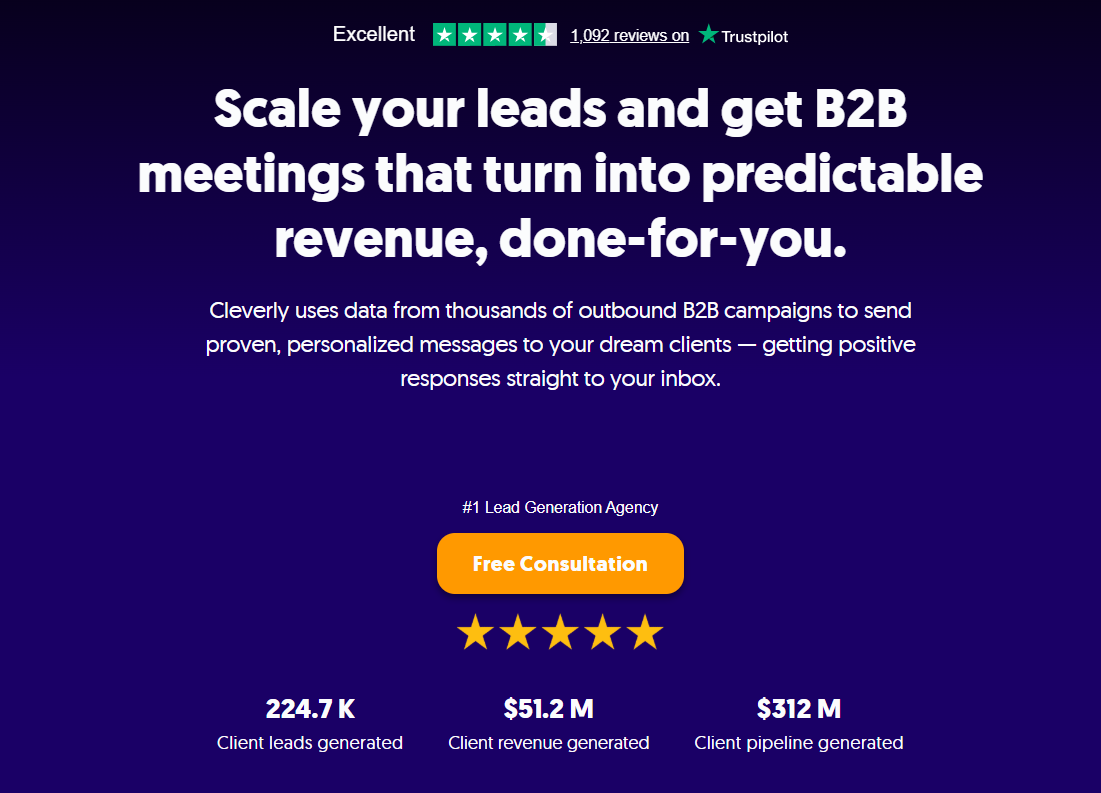
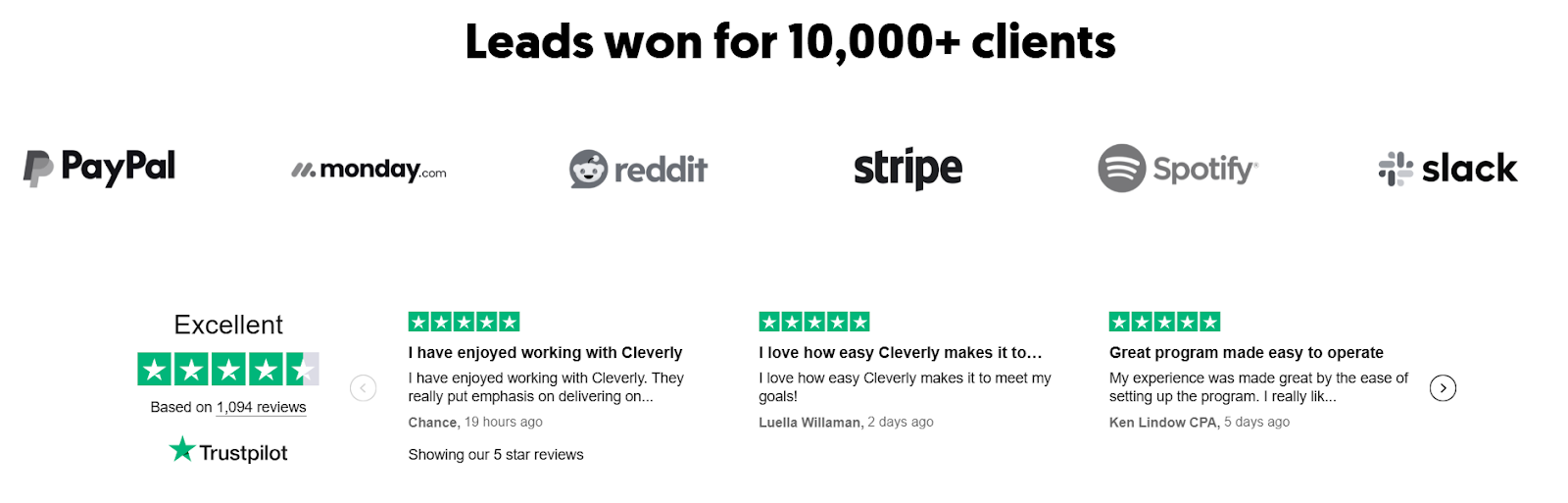
We've helped over 10,000 clients including Amazon, Google, Uber, PayPal, and Slack generate $312 million in pipeline revenue and $51.2 million in closed deals through LinkedIn outreach, cold email, and cold calling.
We're not throwing random leads at your team. We're booking meetings with decision-makers who fit your ICP.
Three ways to fill your pipeline:
- LinkedIn Lead Gen starts at just $397/month. We handle targeting, personalized outreach, and conversation management so qualified prospects land directly in your calendar.
- Cold Email Lead Gen uses our pay-per-meeting model. You only pay for meeting-ready leads we send you. No wasted budget on unqualified contacts.
- Cold Calling delivers 10-30 qualified sales calls every month, guaranteed. We place a trained, no-accent appointment setter, write breakthrough scripts, provide the dialer and data, and cost half what in-housing does. We've made over 1 million cold calls and set 53,000+ appointments.
The pipeline equation that actually works:
Strong pipeline management + high-quality lead sourcing = higher close rates. Your CRM tracks the deals. We make sure there are deals worth tracking.
As a B2B lead generation agency, we handle the hardest part of sales: getting qualified prospects to say yes to a meeting.
You handle what happens after. That's how pipelines turn into predictable revenue.
🚀 Ready to Start? Book a FREE Consultation

Conclusion
The best sales pipeline software is not the product with the longest feature list. It is the one your team will update consistently, your managers can trust, and your RevOps resources can support.
Start with the sales process. Define your stages, qualification criteria, ownership rules, and reporting requirements before comparing platforms. Then shortlist the tools that fit your team size and sales motion, test them with real opportunities, and calculate the full implementation cost.
Once the system is live, require a next step for every active deal and review stalled opportunities weekly. The software provides visibility. Clear processes, accurate data, consistent follow-up, and qualified lead flow turn that visibility into revenue.
Frequently Asked Questions
Free Resource
How to Scale a Profitable Cold Call System
Get the complete guide — download it instantly now.

Free Ebook
Download the Free Guide
Enter your details to get instant access.
You're all set! 🎉
Your ebook is downloading now.
Click below if the download didn't start automatically.